404ops Activity Log
Audit log for WordPress: records events into a local table with filters, retention, CSV export, and a daily email digest.
Screenshots and diagramsRecord security-relevant site events in your own database: logins and failed logins, post and page changes, plugin and theme installs and updates, user and role changes, settings changes and more. Each event stores its time, the acting user, a truncated IP address, device and browser, the event type, the object affected and a summary. Free retention supports 1 to 36,500 days or keeping events indefinitely, with 90 days as the default. Daily cleanup removes events older than the chosen finite period and leaves them in place while indefinite retention is enabled.
Features
- Logs logins, failed logins and logouts, and profile, email, password and application-password changes. Passwords and password hashes are never stored.
- Logs post and page create, edit, trash, restore and delete, plugin and theme changes, WordPress core updates, and file editor saves (the file and its size, never its content).
- Logs user create, delete and role changes, and what a role may do.
- Logs changes to the General, Writing, Reading, Discussion and Permalinks settings, menus, widgets and media, and content and personal-data exports and erasures.
- With WooCommerce active, also records order status and product price and stock changes.
- With Gravity Forms, WPForms, Contact Form 7, Yoast SEO, Rank Math, ACF, LearnDash, LifterLMS, MemberPress, Paid Memberships Pro or Elementor active, records their form, SEO, custom-field, course, membership and page-builder changes. It never records what was typed into a form, a custom field's value or a payment.
- A filterable log viewer with search, pagination and CSV export, with country and device filters and markers on suspicious sign-ins.
- A tamper-evident log: every event is sealed into a keyed chain and the log verifies itself daily, so an edited, removed, inserted or reordered entry shows up.
- A file integrity scan that compares core and plugin files against WordPress.org checksums and a recorded baseline. It runs only when you start it or switch on the daily scan.
- A daily summary email digest, and email alerts for high-risk events.
- A read-only REST route and WP-CLI commands for administrators.
- Exclude chosen users or roles from the log, and import history from Simple History, WP Activity Log or Stream.
- IP addresses are truncated by default. Country and city come from a MaxMind database you supply, looked up on your own server.
- Works with WordPress's personal-data export and erasure tools.
What Pro adds
- External forwarding. Copy each event as it is recorded to a Slack channel, to your own HTTPS webhook (optionally signed with a shared secret), or to the server's syslog. Every destination is off until you switch it on.
- Monthly archives. Optionally write each previous month to a CSV file under uploads, and choose whether to remove those archived rows from the database.
- Saved reports and views. Save a filtered view as a named report, reopen it with one click, and have it emailed daily or weekly, with the matching rows attached as CSV, to recipients you choose.
- Weekly "what changed" summary. An optional weekly email that compares the week with the one before and flags anomalies. If you connect your own AI provider it adds a short summary written from figures with names, addresses and secrets removed.
- Log tampering alerts and an optional off-site anchor for the tamper-evident log. Both are off by default.
Pro is a separate add-on that needs the free plugin. Everything listed above under Features stays free.
Free version
The free version is available on WordPress.org.
AI and external data
AI summaries require Activity Log's explicit opt-in and a compatible provider configured through WordPress Settings → Connectors. WordPress chooses a compatible provider, and that choice can change as configured providers change. The WordPress AI Client sends the provider daily event counts by type and anomaly descriptions. Without the opt-in or a compatible provider, the digest uses a local overview and sends no data to AI. The Pro weekly summary, when enabled for AI, sends redacted figures, flags and change summaries. Optional WordPress checksum requests, MaxMind downloads, configured Pro event forwarding and Pro licensing are separate flows.
Read the installed edition's External Services disclosure before enabling a feature. Review the provider policies and DPA considerations.
Paid purchases are temporarily unavailable. Free downloads and existing licences remain available.
Free version on WordPress.org →See the log in action
Explore the Free edition's event viewer, integrity checks, settings and history import. Screens show version 0.21.0 with fictional sample data.
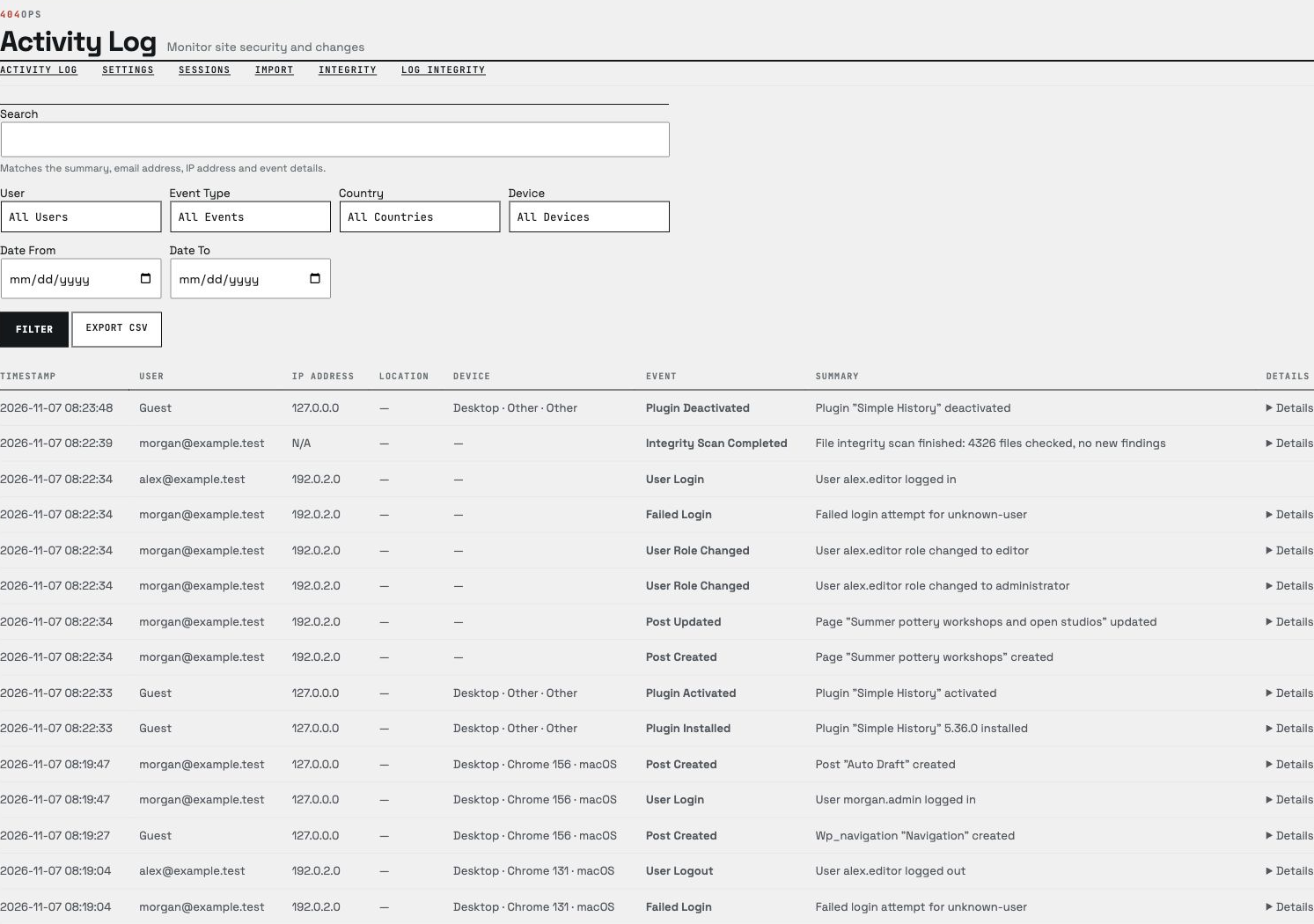
Find the event you need
Search the activity log, narrow the results with filters, and export matching events as CSV.
Open full-size screenshot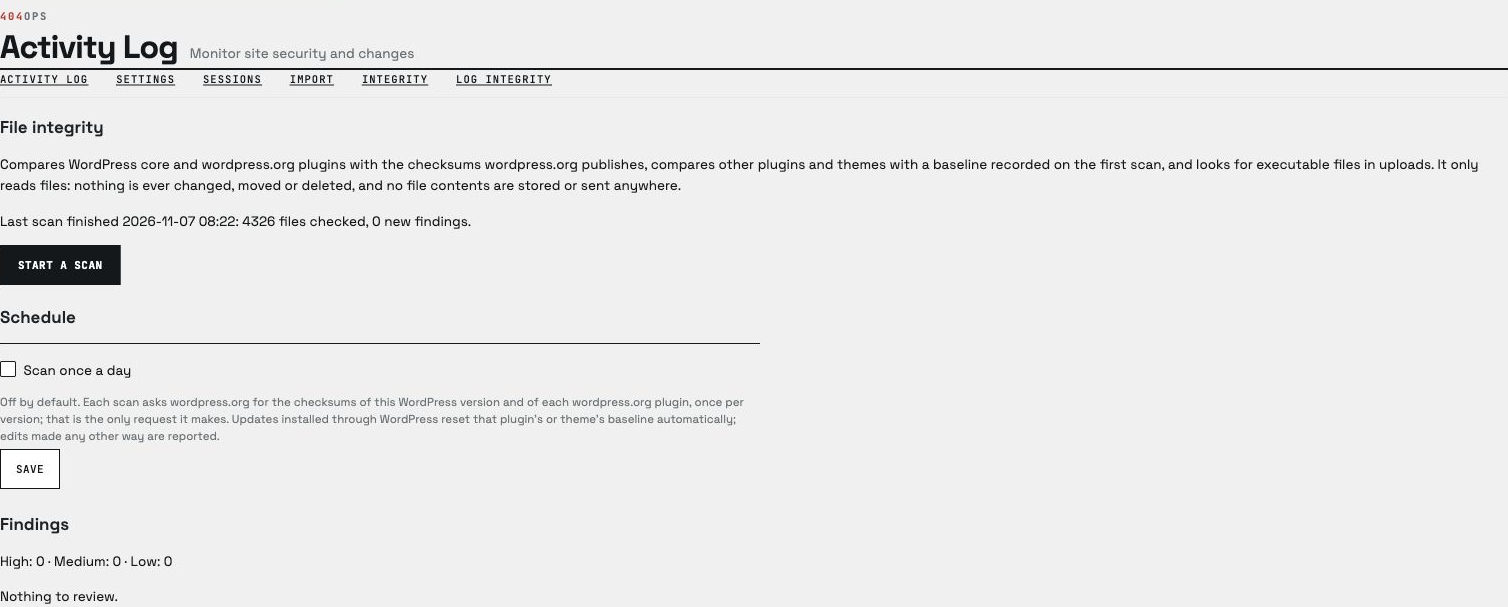
Review file integrity
Compare files with WordPress.org checksums and a recorded baseline. Scans run when you start one or enable the daily scan.
Open full-size screenshot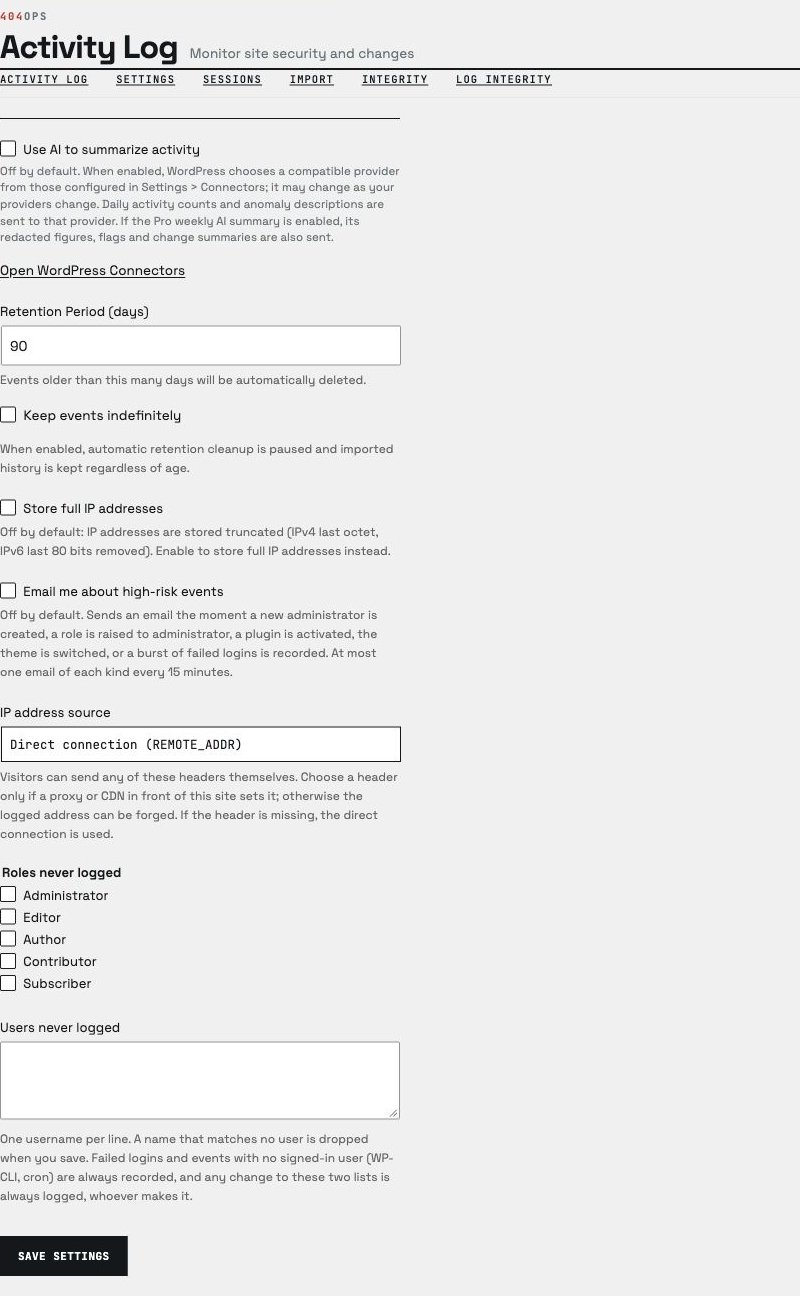
Choose what you keep
Set retention, IP truncation, high-risk alerts and user or role exclusions for your site.
Open full-size screenshot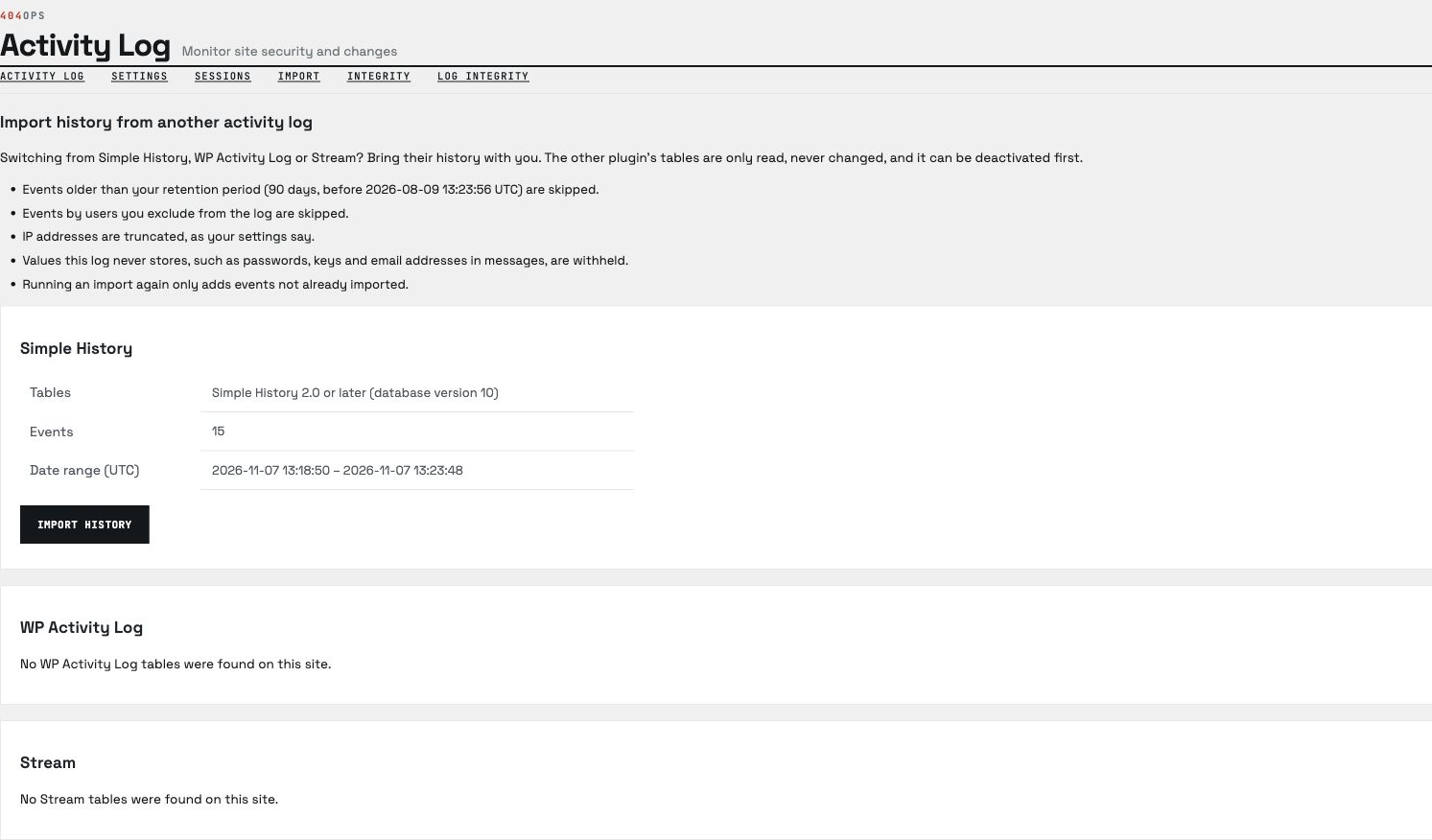
Bring your history along
Import existing events from Simple History, WP Activity Log or Stream.
Open full-size screenshotFrom event to overview
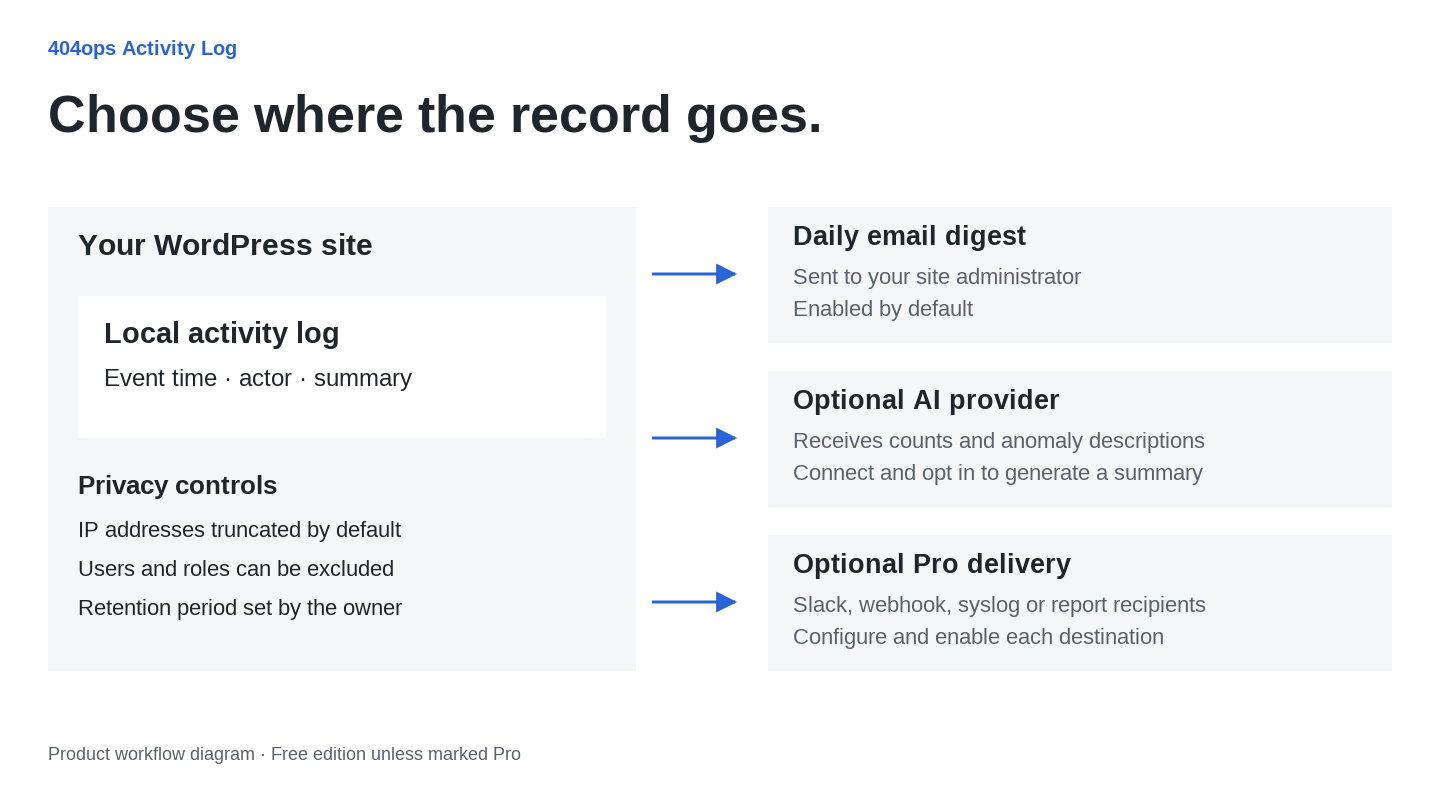
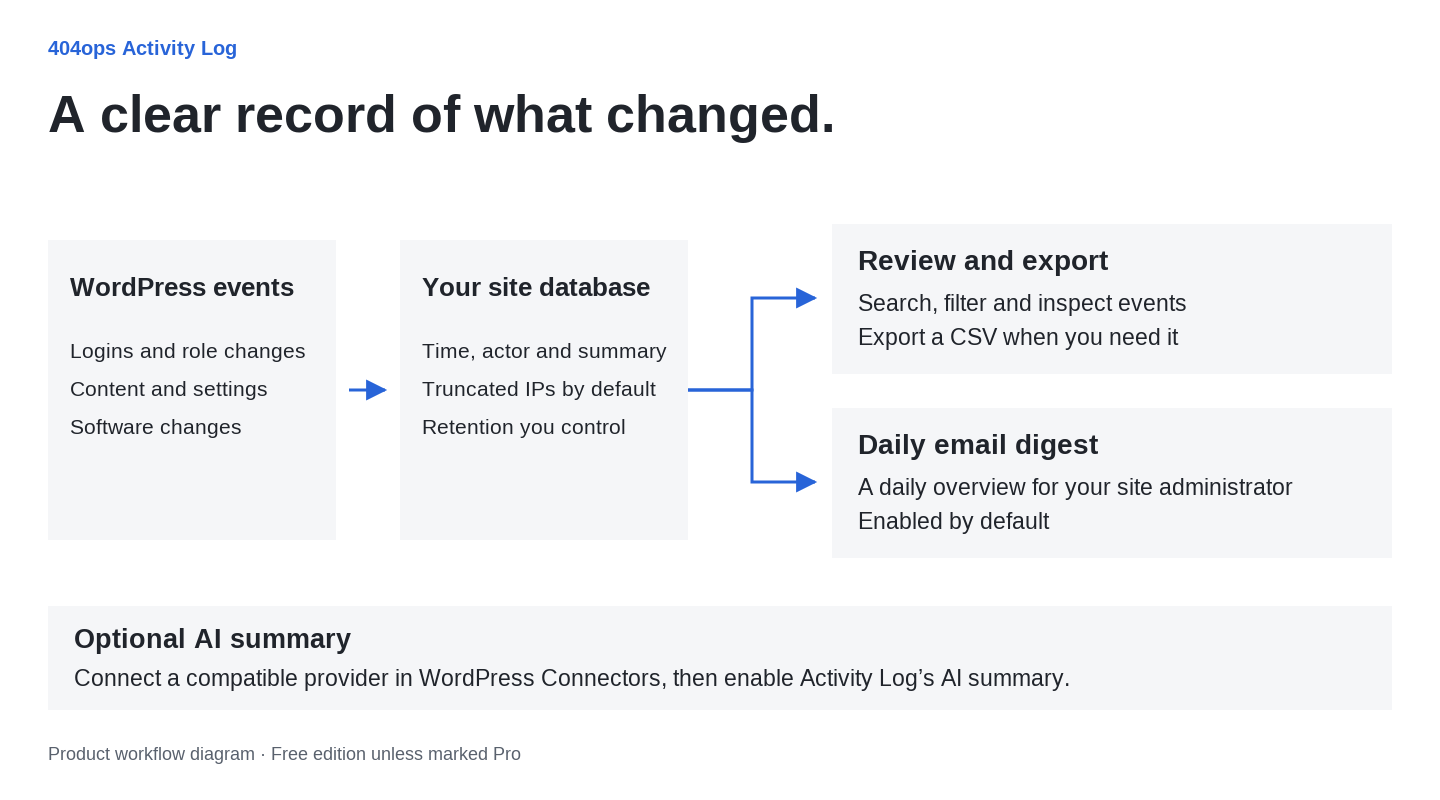
Site events are recorded in your own WordPress database. Search and filter the log, then export a CSV or read the daily email digest. File checks and AI features are opt-in.
Where the log goes
The log stays in your site database. The daily digest emails the site administrator and is enabled by default. AI summaries require a configured connection and opt-in. Pro forwarding and scheduled reports stay off until you configure them.